The details
| Brand | Ugreen |
|---|
Description
- Supports up to 60W USB Power Delivery charging
- Maximum charging rating of 20V/3A
- USB 2.0 data transfer up to 480Mbps
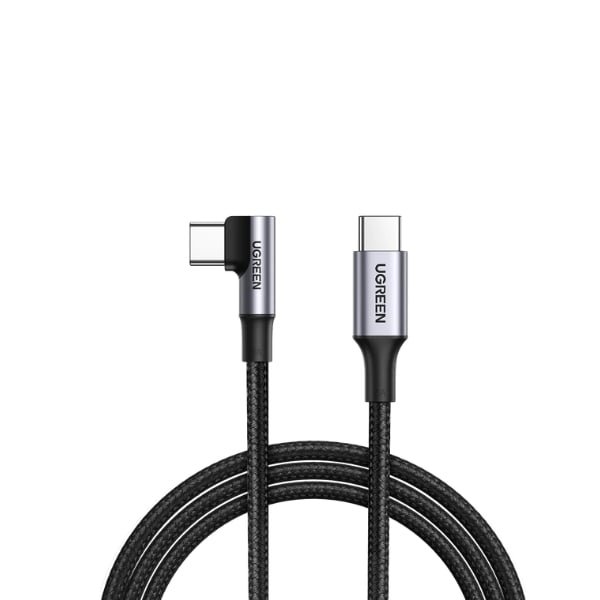
UGREEN 80714 60W Angled USB-C Cable 3m – Black
The UGREEN 80714 USB-C to Angled USB-C Cable combines a useful 3-metre length with a convenient 90-degree connector. Its L-shaped end helps route the cable alongside your device, making it easier to hold a compatible phone while charging, watching videos or playing games.
With support for up to 60W USB Power Delivery charging at 20V/3A, it is suitable for compatible USB-C phones, tablets and laptops. Actual charging speed depends on the charger and connected device.
Q&A
1. What connectors does this cable have?
It has two USB-C male connectors: one straight connector and one 90-degree angled connector. It does not have a USB-A plug.
2. How long is the cable?
The cable is 3 metres long, providing extra reach between your charger and device.
3. Does it support fast charging?
Yes. It supports up to 60W charging at 20V/3A with a compatible USB-C Power Delivery charger and device.
4. Can I use it to charge a laptop?
Yes, if the laptop supports USB-C charging. The cable supports up to 60W, so laptops requiring more power may charge slowly or need a higher-rated cable and charger.
5. Can it charge an iPhone?
It can charge iPhones with a USB-C charging port using a compatible USB-C charger. It does not connect directly to iPhones with a Lightning port.
6. Does it support file transfers?
Yes. It supports USB 2.0 data transfer at up to 480Mbps. Actual transfer speed depends on the connected devices and files.
7. Can I connect my laptop to a monitor with this cable?
No. This model does not support USB-C video output. Use a suitable video-capable USB-C cable for a monitor connection.
8. Will the angled connector fit my phone case?
Fit depends on the case’s charging-port opening and surrounding thickness. Check that the angled housing can sit fully against the port without the case blocking it.
9. Does it require an app or driver?
No special app is required for charging. For file transfers, your phone may need to be unlocked and set to file-transfer mode.